
PCI DSS 6.4.3 and 11.6.1: A Compliance Guide to Payment Page Script Management and Change Detection
How PCI DSS v4.0.1 Requirements 6.4.3 and 11.6.1 apply to e-commerce payment page scripts, the e-skimming risk they address, and where merchant and payment service provider responsibilities divide.
This article sets out what these two e-commerce script security requirements specify for a merchant’s checkout page, and where responsibility divides between the merchant and the payment service provider.
Quick answer: Requirement 6.4.3 requires the merchant to manage every script on the payment page: confirm that each one is authorised, assure its integrity, and maintain an inventory with a business or technical justification for each. Requirement 11.6.1 requires a mechanism that detects unauthorised changes to the payment page scripts and security-impacting HTTP headers as received by the consumer browser, and alerts on them, at least weekly or at the frequency defined in a targeted risk analysis. The two look similar, but 6.4.3 is a preventive control (it stops a tampered script from continuing to execute), while 11.6.1 is a detective control (it raises an alert once tampering of script content or HTTP headers is detected).
A checkout page does more than collect card numbers. It also loads analytics tools, live chat, a tag management system, product reviews and code from the payment service provider. All of this is delivered to the user’s browser as scripts, and each one is executed in turn.
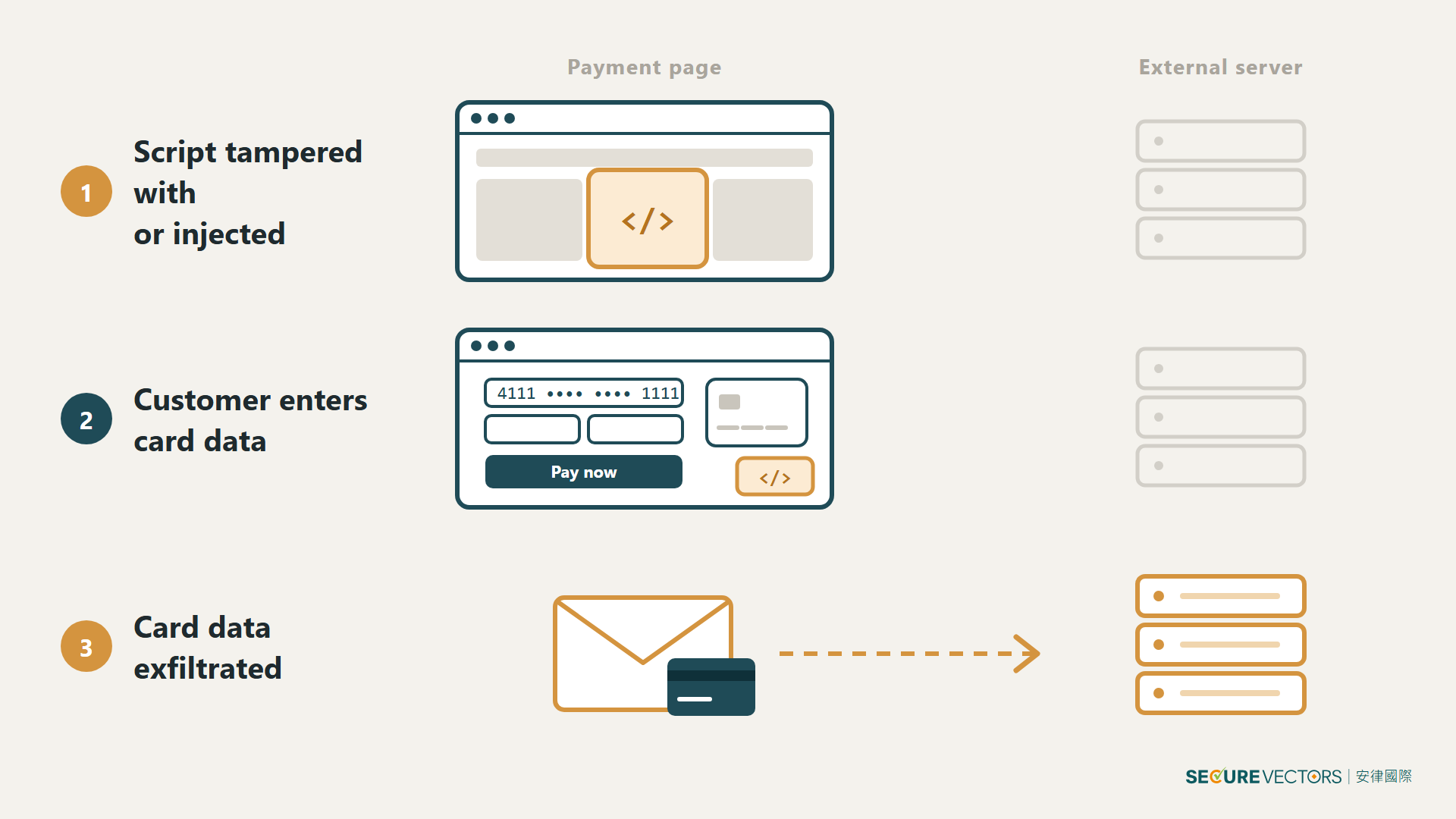
That flexibility comes with risk. PCI SSC guidance calls it e-skimming: a script on the payment page is tampered with, or a new one is quietly injected, so that it reads card data as the customer types it and sends that data elsewhere. PCI DSS v4.0.1 addresses this with two requirements.
Do Requirements 6.4.3 and 11.6.1 apply to your business?
Requirements 6.4.3 and 11.6.1 were introduced in PCI DSS v4.0 and became mandatory on 31 March 2025.
What the requirements say and what assessors examine
- 6.4.3: Manage payment page scripts
Requirement: for every script on the payment page that is executed in the consumer’s browser, a method is in place to confirm that it is authorised, a method is in place to assure its integrity, and an inventory is maintained with a written business or technical justification for each script.
Testing procedures examine: policies and procedures, the script inventory, and system configurations. - 11.6.1: Detect changes
Requirement: a change- and tamper-detection mechanism is deployed that alerts personnel to unauthorised modification of the payment page scripts or security-impacting HTTP headers as received by the consumer browser. It runs at least weekly, or at the frequency defined in the entity’s targeted risk analysis (Requirement 12.3.1).
Testing procedures examine: mechanism configuration, the monitored pages, and the monitoring results.
Requirement 12.10.5 then brings the alerts this mechanism generates into the incident response plan.
SAQ A eligibility criteria for merchants
Both requirements appear in SAQ A-EP, SAQ D and the Report on Compliance (ROC). SAQ A, as revised in January 2025, no longer lists them. Instead, e-commerce merchants completing SAQ A must confirm the following two eligibility criteria (the second is new):
- All elements of the payment page(s)/form(s) delivered to the customer’s browser originate only and directly from a PCI DSS compliant third-party service provider (TPSP)/payment processor.
- The merchant has confirmed that its site is not susceptible to attacks from scripts that could affect the merchant’s e-commerce system(s).
Because the second criterion is the merchant’s own declaration, the merchant should hold a specific, documented basis for it. Which SAQ applies, if any, is still for the acquirer to determine.
Under PCI SSC FAQ 1588, the second criterion applies only to merchants whose page embeds a TPSP’s payment form (for example, in an iframe). It does not apply to merchants that redirect customers to the TPSP, or that fully outsource the payment process (for example, by emailing a payment link).
FAQ 1588 notes that merchants can use the techniques described in Requirements 6.4.3 and 11.6.1 to protect their web pages from script attacks targeting account data, and that these techniques can be deployed by the merchant or by a third party.
Which scripts count as payment page scripts, and who is responsible?
What is a payment page script?
The PCI DSS Glossary defines a payment page script as any programming language command or instruction on a payment page that is processed and/or interpreted by the consumer’s browser. JavaScript is one example; HTML and CSS are not. Requirement 6.4.3 covers scripts from the merchant’s own environment and scripts from third parties, such as vendor code pulled in by an analytics tag.
Under PCI SSC FAQ 1592, a third-party script provider is not considered a TPSP for the purposes of Requirements 12.8 and 12.9 if it supplies only scripts unrelated to payment processing, and those scripts do not affect the security of cardholder data or sensitive authentication data.
Where responsibility divides for embedded forms (iframes)
Where a payment form is embedded in the merchant’s web page, for example in an iframe, the applicability notes for these requirements divide responsibility as follows:
- Scripts on the merchant’s web page that contains the embedded form are the merchant’s to manage and monitor.
- Scripts inside the service provider’s embedded form are the service provider’s responsibility.
PCI SSC guidance extends the same logic to scripts that redirect the customer to the service provider, and to every view of a single-page application (SPA), where scripts keep loading as the customer moves between views.
Prevent and detect: how Requirements 6.4.3 and 11.6.1 divide the work
Requirement 6.4.3 is prevention: know what is running, approve it, and make sure it has not been tampered with. Requirement 11.6.1 is a detective control: it identifies changes to the content delivered to the browser and alerts the personnel responsible for responding. It does not mean installing software in the customer’s browser.

PCI DSS does not mandate a particular tool. The official guidance lists approaches such as Subresource Integrity (SRI), Content Security Policy (CSP) and external monitoring that loads and analyses the page, and cautions that no single mechanism may be sufficient on its own to meet the requirement.
Don’t treat an embedded form as an exemption
An embedded payment form reduces what the merchant has to manage, but the merchant’s own page remains in scope. The PCI SSC Information Supplement on these two requirements states that embedding a third-party payment form does not take the merchant’s embedding page (the parent page) fully out of scope, nor does it make Requirements 6.4.3 and 11.6.1 not applicable (merchants eligible for SAQ A confirm the eligibility criteria instead). Scripts on the parent page can still alter what surrounds the form, or change which form is loaded. The guidance for Requirement 6.4.3 recommends using the parent page’s CSP to restrict where the payment form can be loaded from.
At its core, payment page script management is about whether the merchant has a clear view of every script running on the page: why each one is needed, who approved it, and how quickly an alert would be raised and a response started if it were changed. An embedded form narrows the scope, but it cannot replace managing your own page. If you are unsure which SAQ applies, whether your script inventory is complete, or whether your current monitoring meets Requirement 11.6.1, we recommend discussing it with a QSA familiar with PCI DSS before your assessment.
Glossary
- Merchant: a business that has contracted with an acquirer to accept card payments, as defined in PCI DSS.
- TPSP (Third-Party Service Provider): an external business that provides services such as payment processing to the merchant.
- SAQ (Self-Assessment Questionnaire): the questionnaire a merchant completes, according to its payment environment, to demonstrate compliance to its acquirer.
- ROC (Report on Compliance): the PCI DSS assessment report issued by a Qualified Security Assessor.
- Payment page script: a programming language instruction on a payment page that is processed or interpreted by the consumer’s browser, such as JavaScript.
- E-skimming: an attack that injects or tampers with a script on a payment page to read and exfiltrate card data as the customer enters it.
- SRI (Subresource Integrity): a mechanism by which the browser uses a pre-declared hash to verify that an external script file has not been altered.
- CSP (Content Security Policy): a mechanism by which a site declares the sources from which the browser may load scripts and other resources.
- iframe: an element that embeds the content of another, separate web page within a page; commonly used to embed a payment service provider’s form.
- Parent page: the merchant’s outer page in which the iframe is embedded.
- SPA (Single-Page Application): a site architecture in which scripts update the view dynamically instead of reloading the whole page when the user moves between views.
- Targeted risk analysis: under Requirement 12.3.1, an analysis in which the entity itself sets the frequency at which a specific requirement is performed.
Frequently asked questions
Q1: If we embed the payment service provider’s form in an iframe, do we still need to manage scripts?
Scripts inside the form are the payment service provider’s responsibility; scripts on the merchant’s page must still be managed and monitored by the merchant. Embedding the form does not take the merchant’s parent page fully out of scope. Merchants using SAQ A confirm the eligibility criteria instead, as the next question explains.
Q2: Do merchants using SAQ A still need to do this?
SAQ A no longer lists the two requirements, but the merchant must confirm the eligibility criteria. Under FAQ 1588, the criterion that the site is not susceptible to script attacks applies only to merchants that embed a TPSP’s form (such as in an iframe); it does not apply to merchants that redirect or fully outsource payment. This confirmation is the merchant’s own statement and needs a basis; which SAQ applies is decided by the acquirer.
Q3: How often must Requirement 11.6.1 be performed? Can we set our own frequency?
The default is at least once a week. A merchant may set a different frequency based on its own targeted risk analysis (Requirement 12.3.1), but it needs a documented risk analysis to support it, and the assessment will check that the analysis and actual practice are consistent.
Q4: Do we have to use CSP or SRI?
No. PCI DSS does not mandate a tool. PCI SSC guidance only lists examples such as SRI, CSP and external monitoring, and cautions that a single mechanism may not be enough.
Q5: Is an analytics vendor a TPSP?
Under FAQ 1592, a third-party script provider is not considered a TPSP for the purposes of Requirements 12.8 and 12.9 if it supplies only scripts unrelated to payment processing, and those scripts do not affect the security of cardholder data or sensitive authentication data. The merchant confirms both conditions itself.
References
Sources: PCI DSS v4.0.1 (Requirements 6.4.3, 11.6.1, 12.8, 12.9 and 12.10.5, and the Glossary); PCI SSC Information Supplement Payment Page Security and Preventing E-Skimming – Guidance for PCI DSS Requirements 6.4.3 and 11.6.1 (published 2025); and SAQ A for PCI DSS v4.0.1 (revised January 2025). All are available from the PCI SSC Document Library. Requirements are stated as rules; content identified as guidance is advisory.