PCI DSS v4.0.1 Compliance: A Developer’s Guide to ASV Scans

PCI DSS v4.0.1 Compliance

A Developer’s Guide to ASV Scans, 

beyondthe Green Checkmark

You patched the server. You updated the certs. You ran the scan. It failed anyway.
If you’ve ever stared at an ASV scan report wondering why your perfectly reasonable infrastructure just got flagged for 47 vulnerabilities — half of which feel like false positives — welcome to the club.
PCI DSS 4.0.1 didn’t just move the goalposts; it added new ones most developers didn’t see coming. This guide is for the people who actually have to fix things when scans go red. Not the compliance officers, not the auditors — the developers and engineers who get the ticket at 4 PM on a Friday because the quarterly scan window closes Monday.

What Even Is an ASV Scan?

An Approved Scanning Vendor (ASV) is a company authorized by the PCI Security Standards Council to perform external vulnerability scans on your internet-facing systems. Think of it as a standardized penetration-lite: the ASV probes your public-facing IPs, domains, and services looking for known vulnerabilities, misconfigurations, and policy violations.
The scan itself is non-intrusive — it won’t exploit anything — but it will catalog everything it finds and score it using CVSS (Common Vulnerability Scoring System). The magic number is 4.0. Any vulnerability with a CVSS base score of 4.0 or higher means an automatic failure.
Under PCI DSS Requirement 11.3.2, these scans must happen at least once every three months (quarterly), and after any significant change to your environment — new servers, major deployments, infrastructure migrations, firewall rule changes.
That second point is the one developers tend to miss. Shipped a new payment API endpoint last Tuesday? That potentially triggers a rescan requirement.

What Changed in PCI DSS 4.0.1?

Let’s clear up a common misconception: PCI DSS 4.0.1 is not a major version bump. It’s a limited revision of v4.0 — mostly typographical fixes, formatting corrections, and clarified guidance. No new requirements were added or removed.
But here’s why it matters. PCI DSS v4.0 introduced several “future-dated” requirements that became mandatory on March 31, 2025. These are the real changes, and v4.0.1 is now the only supported version enforcing them. If you’re not already compliant, you’re already behind.
The requirements that hit developers hardest:

1. Authenticated Internal Vulnerability Scans (Req. 11.3.1.2)

Previously, internal scans were typically unauthenticated — the scanner checked services without logging into them. Now, internal scans must use authenticated credentials to log into systems and inspect them from the inside. This means:
  • Your scanning tool needs service accounts with sufficient privileges to conduct thorough scans
  • Those accounts must comply with Requirement 8.2.2 (password policies, MFA considerations) if they can be used for interactive login
  • Systems that cannot accept credentials — some network appliances, mainframes, containers — must be explicitly documented
  • The scan coverage is dramatically deeper; expect more findings, not fewer
For developers, this means your staging and internal environments are now under the microscope in ways they weren’t before. That internal admin panel you never hardened because “it’s behind the VPN”? It’s in scope now.
Treat your scanning credentials as highly privileged. Protect them following PCI DSS Requirements 7 and 8. And here’s one piece of good news: authenticated scanning is not required for internal scans performed after significant changes (Req. 11.3.1.3). Only the regular quarterly scans need full credentials.

2. Payment Page Script Management (Req. 6.4.3)

Every script running on your payment pages must be:
  • Authorized — explicitly approved via a manual or automated workflow
  • Integrity-checked — using Subresource Integrity (SRI) hashes, Content Security Policy (CSP), or equivalent mechanisms
  • Inventoried — documented with a written business or technical justification for why each script is necessary
This is PCI’s response to the Magecart-style e-skimming attacks that have plagued e-commerce. If you’re loading Google Analytics, a chat widget, and three marketing pixels on your checkout page, each one needs to be accounted for.
One exception worth knowing: 3DS scripts are exempt from Req 6.4.3 validation. The PCI SSC considers the trust relationship established during merchant onboarding sufficient. Anything running outside the 3DS flow is still subject to the requirement.

3. Payment Page Tampering Detection (Req. 11.6.1)

You need a change- and tamper-detection mechanism that alerts your team when someone or something modifies the HTTP headers or script contents of your payment pages as received by the consumer’s browser. The mechanism must catch three scenarios: a new script appearing, an existing script changing, or a security header being removed.
PCI points you toward Content Security Policy (CSP) and Subresource Integrity (SRI), but also recognizes external synthetic monitoring, tamper-detection scripts, reverse proxies, and CDN-based detection. The key constraint: whatever you use must run at least weekly, or at a frequency justified by a targeted risk analysis per Requirement 12.3.1.
The intention is not to install anything in your users’ browsers. It’s about server-side or monitoring-layer detection of unexpected changes.

4. SAQ A Merchants Now Need ASV Scans

Previously, small e-commerce merchants using full-redirect payment flows (SAQ A) were largely exempt from ASV scanning. Under v4.0, they now need quarterly external scans too. If you maintain sites for small merchants, this is a new conversation to have with your clients.

The Top Reasons Your Scan Just Failed

After years of collective developer pain, the failure patterns are remarkably consistent. These aren’t exotic zero-days — they’re the mundane things that slip through the cracks.

TLS/SSL Configuration Issues

The single most common failure category. Your scan will fail if:
  • TLS 1.0 or TLS 1.1 are still supported (both are prohibited)
  • You’re offering weak cipher suites (RC4, DES, 3DES, export ciphers)
  • Your certificate is expired, self-signed, or has a hostname mismatch
  • You’re missing HSTS headers or have them misconfigured
Recommended Nginx TLS configuration:
ssl_protocols TLSv1.2 TLSv1.3;
ssl_ciphers ‘ECDHE-ECDSA-AES128-GCM-SHA256:ECDHE-RSA-AES128-GCM-SHA256:ECDHE-ECDSA-AES256-GCM-SHA384:ECDHE-RSA-AES256-GCM-SHA384’;
ssl_prefer_server_ciphers on;
add_header Strict-Transport-Security “max-age=31536000; includeSubDomains” always;
Verify before scan day: nmap –script ssl-enum-ciphers -p 443 yourdomain.com

Exposed Administrative Interfaces

phpMyAdmin on a public IP. An open RDP port. WordPress /wp-admin accessible from the internet. A Kubernetes dashboard without authentication. All automatic failures.
Move admin interfaces behind a VPN or bastion host. Use IP allowlisting at the firewall or load balancer. If external access is truly required, enforce MFA and document why.

Outdated Software and Missing Patches

ASV scanners maintain databases of known CVEs. If your Apache version has a known vulnerability with CVSS >= 4.0, you fail. It doesn’t matter if you think the vulnerability isn’t exploitable in your specific configuration.
The usual suspects: web servers (Apache, Nginx, IIS), application runtimes, OpenSSL/OpenSSH, CMS platforms and their plugins, DNS servers. Subscribe to vendor security advisories. Automate patching where possible. Cloud-hosted assets and containerized workloads are in scope too.

Open Ports and Unnecessary Services

Every open port is an attack surface. The ones that burn developers most often:
  • FTP (21) — especially anonymous FTP
  • Telnet (23) — unencrypted remote access
  • SMTP (25) — open mail relays
  • DNS (53) — recursion-enabled resolvers
  • Database ports (3306, 5432, 1433) — directly internet-accessible
Run only what you need. Firewall everything else. If in doubt, close it.

HTTP Security Headers

Missing headers won’t always fail your scan alone, but they contribute to findings and can push your CVSS aggregate over the line:
Content-Security-Policy: default-src ‘self’; script-src ‘self’; style-src ‘self’
X-Content-Type-Options: nosniff
X-Frame-Options: DENY
Referrer-Policy: strict-origin-when-cross-origin
Permissions-Policy: camera=(), microphone=(), geolocation=()

The False Positive Problem

ASV scanners aren’t perfect. They rely heavily on banner grabbing and version detection, which means they flag vulnerabilities that have already been patched via backporting — a common practice on RHEL, Debian, and Ubuntu.
Your scan reports OpenSSH 8.2 has CVE-2023-38408. But you’re running Ubuntu 22.04, which backported the fix into their 8.2 package. The scanner sees “8.2” and panics. It doesn’t know about the backport.
You have the right to dispute findings. Do it effectively:
  1. Gather evidence — installed package versions (dpkg -l, rpm -q), vendor security advisories confirming the backport, configs showing mitigating controls
  2. Be specific — reference the exact CVE, explain the distribution, show the patched version string
  3. Document when and how you collected the evidence
  4. Submit in writing to your ASV with clear descriptions
 
The ASV reviews the dispute and either reclassifies the finding or confirms it as valid. This stays between you and the ASV — it doesn’t go to the PCI SSC.
Don’t dispute everything. ASVs notice when companies contest 30+ findings every quarter. Fix what you can, dispute only the genuine false positives.

Building ASV-Scan-Resilient Infrastructure

The best way to survive ASV scans is to stop treating them as a quarterly fire drill.

Run Your Own Scans First

Run vulnerability scans before the ASV does. OpenVAS, Nessus, or Qualys can surface issues weeks before the official scan window:
# TLS check before the ASV gets there
testssl.sh –severity HIGH yourdomain.com
# Common web vulnerability check
nikto -h https://yourdomain.com

Integrate Security Into CI/CD

  • Container image scanning before deployment (Trivy, Grype)
  • Dependency vulnerability scanning in your build (npm audit, pip-audit, OWASP Dependency-Check)
  • Infrastructure-as-code scanning for misconfigurations (tfsec, checkov)
A vulnerability caught in CI never reaches the ASV scan.
For payment pages specifically, consider adding a pipeline step that validates SRI attributes on script tags and checks CSP headers against your approved script inventory. Real coverage requires a tool that understands dynamic script loading.

Maintain a Living Asset Inventory

You must scan all external-facing IPs and domains (Req. 11.3.2). You can’t scan what you don’t know about. Shadow IT, forgotten staging servers, that test subdomain from three sprints ago — these are the things that blow up your scan.
Maintain a living inventory. Review it before each scan window. Kill what you don’t need.

Payment Page Hygiene

For your checkout pages, every script needs SRI and your CSP needs violation reporting:
<script
src=”https://js.stripe.com/v3/”
integrity=”sha384-abc123…”
crossorigin=”anonymous”>
</script>
# Nginx: CSP with violation reporting for Req. 11.6.1
add_header Content-Security-Policy
“default-src ‘self’;
script-src ‘self’ https://js.stripe.com;
object-src ‘none’;
report-uri /csp-report;
report-to csp-endpoint;” always;
You’ll need a backend endpoint (or a service like report-uri.com) that receives these violation reports and alerts your team. That’s what satisfies the alerting component of Req. 11.6.1.
One thing developers get wrong with SRI: it’s not “set and forget.” When your payment processor ships a new JS bundle, your hash breaks and the browser blocks the script. Build SRI hash regeneration into your dependency update process.

Who Owns What: Payment Page Responsibility

If you’re integrating a third-party payment provider, the responsibility split for Req. 6.4.3 and 11.6.1 depends on how you’ve built the integration:

Integration
Model

You Own

Your Payment Provider Owns

Your own payment form

Every script on your page

Scripts they provide for their services

Direct post (card data goes straight to provider)

Every script on your page

Scripts they provide for their services

Embedded iframe (Stripe Elements, Adyen Drop-in)

Scripts on your page, outside the iframe

Everything inside the iframe

Full redirect (customer leaves your site)

Scripts on your page with the redirect link

Everything on their hosted page

Fully outsourced (provider hosts everything)

Nothing for 6.4.3 / 11.6.1

All of it

If you’re using Stripe Elements or Adyen Drop-in (iframe model), you’re responsible for your parent page’s scripts. They handle theirs inside the iframe. Get this wrong and you’ll either over-invest or leave a gap.

Script Inventory

PCI DSS doesn’t prescribe a format. A spreadsheet works fine for simple setups:
ScriptSourceSRI HashWhy It’s ThereApproved ByDate
Stripe.jsjs.stripe.com/v3/sha384-…Payment processingJ. Smith2026-01-15
GA4googletagmanager.com/gtag/jssha384-…Conversion trackingM. Lee2026-01-15
Hotjarstatic.hotjar.com/c/hotjar-*.jssha384-…UX analytics on checkoutA. Chen2026-02-01
The inventory needs a written justification for every script. “Marketing wanted it” is a justification. No justification at all is a finding.

The Scan Day Checklist

When your quarterly scan window approaches:

  • Asset inventory is current — no forgotten subdomains or IPs
  • Scan scope confirmed with your ASV — coordinate specifics about load balancers, CDNs, third-party providers
  • SSL/TLS certificates are valid and properly configured
  • No admin interfaces are publicly accessible
  • All systems patched to current levels
  • No unnecessary ports or services exposed
  • Payment page scripts match your authorized inventory
  • CSP headers and tamper-detection mechanisms are active and running at least weekly
  • Pre-scan completed with your own tools
  • Evidence ready for known false positives from previous quarters
  • Scanning credentials provisioned for authenticated internal scans
  • Scan accounts that allow interactive login comply with Req. 8.2.2
  • Systems that can’t accept scan credentials are documented

When You Fail

A failed scan isn’t the end of the world. Here’s the process:
  1. Triage — sort findings by CVSS score; 4.0 and above are the blockers
  2. Remediate — patch, reconfigure, or remove the offending services
  3. Rescan — request a rescan from your ASV to verify the fixes
  4. Document — keep records of what was found, when it was fixed, and what changed
  5. Dispute — for genuine false positives only, file a formal dispute with evidence
You can rescan as many times as needed within your quarter. The goal is one clean passing scan per 90-day window.
If you truly cannot fix a vulnerability due to legitimate constraints, PCI DSS allows compensating controls — alternative measures that provide equivalent security. But they require formal documentation, QSA approval, and reassessment at every annual PCI DSS assessment. They’re meant to be the exception. Don’t build your compliance strategy around them.

Quick Reference

Req.
What It Requires
Frequency
Who Performs
11.3.1
Internal vulnerability scans
Quarterly
Qualified internal staff or third party
11.3.1.2
Authenticated internal scans
Quarterly (with 11.3.1)
Qualified internal staff or third party
11.3.1.3
Internal scans after significant changes
After each change
Qualified staff (no authentication required)
11.3.2
External ASV scans
Quarterly
ASV only (no Customized Approach allowed)
11.3.2.1
External scans after significant changes
After each change
Qualified staff (ASV not required)
6.4.3
Payment page script management
Ongoing
Entity (merchant and/or TPSP)
11.6.1
Payment page tamper detection
Weekly or per risk analysis
Entity
Two details from this table worth highlighting. First: post-change scans — both internal and external — don’t require an ASV. Your qualified internal team can handle them, which saves real money if you ship frequently. Second: the CVSS 4.0 automatic-failure threshold applies to external ASV scans specifically. Internal scans use your own risk-ranking process (defined per Req. 6.3.1) to classify what counts as high-risk or critical. The threshold is yours to define, not a fixed number.

The Developer’s Mental Model

Stop thinking of the scan as an audit. Think of it as an external health check that runs against the same attack surface your actual adversaries see. The ASV scanner is doing, at a basic level, what any attacker with Shodan and a CVE database would do.
Every finding in your scan report is something an attacker could also find. The green checkmark isn’t just a compliance artifact — it’s a signal that your external attack surface doesn’t have low-hanging fruit.
PCI DSS 4.0.1 raised the bar, but most of what it asks for is just good security hygiene: patch your systems, encrypt properly, don’t expose admin panels, know what scripts run on your payment pages, and scan from the inside too.
The developers who treat compliance as a continuous practice rather than a quarterly panic are the ones who sleep well the night before scan day.

Source

▪︎ PCI Security Standards Council — PCI DSS v4.0.1 Standard

▪︎ PCI SSC — Guidance for PCI DSS Requirements 6.4.3 and 11.6.1

▪︎ PCI SSC — ASV Program Guide▪︎ PCI SSC Blog — Now is the Time for Organizations to Adopt the Future-Dated Requirements of PCI DSS v4.x

▪︎ RSI Security — PCI DSS v4.0.1: Key Updates and What They Mean

▪︎ VikingCloud — PCI DSS v4.0: Authenticated Vulnerability Scans

▪︎ Basis Theory — Payment Page Security: Embracing PCI 6.4.3 and 11.6.1

▪︎ Imperva — How to Comply with PCI DSS 4.0 Requirements 6.4.3 and 11.6.1

▪︎ UpGuard — How to Comply with PCI DSS 4.0.1 (2026 Guide)

How to Ensure Your ASV External Vulnerability Scan Report Meets PCI DSS?

How to Ensure Your ASV External Vulnerability Scan Report Meets PCI DSS Audit Requirements?

PCI DSS v4.0.1 requires every organization handling payment card data to conduct a quarterly ASV (Approved Scanning Vendor) external vulnerability scan. For many companies, it has become a routine checkbox. But without prior consultant guidance upfront, companies often realize they are in a compliance predicament only after receiving a “Fail” report or when a QSA (Qualified Security Assessor) rejects their submission entirely:
  • ➤ Scoping Anxiety: An incorrectly defined scope produces incomplete target coverage, or worse, a report the QSA rejects entirely

  • ➤ Missed deadlines: Missing scan reports or remediation deadlines can get lost amidst a company’s broader corporate compliance and security tasks.

  • ➤ Overwhelming Remediation: Without prioritized guidance, remediation becomes a bottleneck for an IT team — not a solution.

Secure Vectors believes compliance should be more than digital documents being passed back and forth, and far more than just automated scanning.
Secure Vectors breaks the industry norm of “tools without analytical management.” With over 10 years of PCI compliance consulting experience, we bring consultant-level oversight to every stage of the ASV process — so your report isn’t just generated, it’s audit-ready.
  • 1. Incorrect Scope Definition

  • Scoping errors are the #1 reason ASV reports are rejected by QSAs. If your scan misses a system connected to the CDE, or inadvertently includes out-of-scope assets, the report is invalid regardless of the scan results themselves.

  • Accurate Compliance Scoping to Prevent Resource Drain:
    Secure Vectors conducts a consultant-led scope inventory before every scan begins, covering:

       ➤➤ External websites, payment pages, and checkout flows

       ➤➤ Payment gateways and all transaction-facing APIs

       ➤➤ Every externally reachable IP address and domain tied to cardholder data

  •  
  • ➤ By targeting all external-facing services—such as external websites, payment gateways, and APIs—we prevent compliance failures and resource waste caused by scoping errors. This significantly reduces unnecessary costs in subsequent maintenance and auditing.

    ➤ Non-Intrusive Scanning Aligned with Global Security Standards: Our scoping process uses non-intrusive assessment methods that cause zero disruption to live operations — fully aligned with PCI DSS v4.0.1 technical requirements.

2. Expert Manual Review

A standard automated scan report can contain dozens of false positives — findings that look like vulnerabilities but aren’t. Secure Vectors’ core value lies in “expert manual review,” ensuring IT resources are accurately directed toward the significant vulnerabilities:

Proactive Elimination of False Positives: ASV consultants review reports item by item to verify the status of scanned targets and filter out distracting false positives. False positives are identified and removed before they reach your IT team.

Efficient Report Delivery: Official ASV reports are delivered within 7-10 business days following a successful scheduled scan.

3. Precise Remediation Guidance Aligned with PCI Compliance Validation

Secure Vectors does not merely stop at identifying problems; we provide highly practical and actionable solutions that connects your remediation directly to compliance validation:

Authoritative Standard Assessment: Adheres to the CVSS v3.1 scoring standard recognized by NIST NVD.

➤ Implementation-Ready Remediation Guidance: Providing clear, actionable remediation guidelines for mandatory fixes with a CVSS score of 4.0 or higher.

➤ Full Scan Cycle Management: We offer management and tracking solutions throughout the quarterly/monthly scanning cycle (initial scans and rescans).

Don’t let automated tool noises become an obstacle between you and a passing audit. Secure Vectors provides ASV services backed by expert manual reviews and precise remediation guidance, helping you rapidly transform a “Fail” into a passing report.
 

👉 Purchase Your ASV Scan Now!!

     For a Consultant-Level External Vulnerability Scan Report

Standard Compliance – Quarterly Scan: Suitable for all enterprises requiring PCI DSS.  

Continuous Compliance – Monthly Scan: Ideal for e-commerce platforms, payment service providers, or enterprises with frequent development cycles aiming for zero vulnerabilities.

FAQ

1. Why do reports generated by automated scanning tools often fail to directly pass a PCI DSS audit?

A: Automated scans only produce raw data, which is frequently riddled with false positives and lacks context regarding an organization’s unique network architecture.
The core value of Secure Vectors’s ASV service is “consultant-level manual review.” By proactively eliminating invalid noise, we transform scan results into official reports recognized by PCI DSS QSAs, ensuring professionalism and a high compliance alignment rate.

2. Under the PCI DSS v4.0.1 standard, how is the correct ASV scanning scope determined?

A: Scoping errors are a primary reason external vulnerability scan reports are rejected. In the financial payment industry, for example, scan targets must encompass all external-facing systems connected to the Cardholder Data Environment (CDE), including web services, payment gateways, and API hosts.

3. What does it mean if an ASV scan result shows vulnerabilities with a CVSS score of 4.0 or higher?

A: The CVSS categorizes risk into five levels. For PCI DSS compliance, a score of 4.0 is the baseline for a “Pass” or “Fail”:
  • 0.0 – 3.9 (Low/None): Generally considered low risk; does not prevent a “Pass” scan result.
  • 4.0 – 6.9 (Medium): The ASV scan result will be marked as “Fail“.
  •  7.0 – 8.9 (High): The ASV scan result will be marked as “Fail“.
  •  9.0 – 10.0 (Critical): Extremely high-risk vulnerabilities; the ASV scan result will be marked as “Fail“.
If a score is 4.0 or above, you must perform actual remediation for those vulnerabilities and have an ASV rescan the environment to confirm a secure state before a valid, passing report can be issued.

4. When I receive an external vulnerability scan report, can I judge for myself if something is a false positive? What are common false positives?

A: Determining false positives requires deep cybersecurity and compliance expertise; it cannot rely on intuition alone.
Based on years of practical consultant experience, common ASV false positives include:
  • ➤ Version Detection Errors: Scanning tools may determine a version based solely on banner information, failing to detect that the OS has already applied backported security patches.
  • ➤ WAF/Firewall Interference: Defense appliances may intercept scan traffic, leading to generate incorrect vulnerability inferences.
  • ➤ Non-Production Environment Interference: Scanning test services that fall outside the CDE scope.
Dedicated Secure Vector’s consultants will manually intervene to cross-reference system information and assist organizations in submitting valid false positive disputes to the PCI SSC, avoiding unnecessary remediation costs.

Secure Vectors Accredited as a PCI DSS Approved Scanning Vendor (ASV)

📢Secure Vectors Accredited as a PCI DSS Approved Scanning Vendor (ASV):

🌏Among the Few Compliance Firms in Asia-Pacific Holding Four PCI Certifications

Secure Vectors Technologies Inc. is now officially recognized by the PCI SSC as a PCI DSS Approved Scanning Vendor (ASV), offering trusted, industry-grade vulnerability scanning services.

Secure Vectors International now holds four globally recognized PCI certifications:


PCI DSS QSA(Qualified Security Assessor)

PCI 3DS Assessor

PCI PIN Security Assessor

PCI DSS ASV(Approved Scanning Vendor)


PCI DSS, 3DS, and PIN Security are three of the most critical standards in the payment card industry. With the addition of PCI ASV accreditation—representing advanced technical security expertise—Secure Vectors now offers comprehensive, end-to-end certification services for the financial and payment sectors. Our capabilities span governance, process management, and technical security, delivering a true one-stop PCI compliance solution for our clients.

🔍ASV: The Gold Standard in Vulnerability Scanning and Compliance


ASV is more than a standard vulnerability scan—it is a comprehensive assessment service validated by the PCI Security Standards Council (PCI SSC). Under PCI DSS requirements, all entities that store, process, or transmit cardholder data must submit quarterly vulnerability scan reports. PCI SSC mandates that all eligible financial and payment organizations use an Approved Scanning Vendor (ASV) to conduct these scans and provide official, validated reports.


Achieving ASV recognition involves three critical requirements:


1️⃣ Scanning Tools – The ASV service’s vulnerability detection methods (including manual procedures, workflows, and technical tools) must thoroughly identify all known vulnerabilities according to PCI SSC standards and complete the full Test Bed scan and analysis within 18 hours.

2️⃣ Execution Team – Engineers and service managers performing the scans must pass PCI SSC professional exams annually, ensuring their knowledge and service processes meet PCI SSC standards.

3️⃣ Reporting Process – Officially audited to ensure accurate interpretation of results, proper handling of false positives, and consistent, traceable reporting formats.


Only after final review and approval by PCI SSC can a company and its scanning solution obtain formal ASV status.


This process tests the ASV provider and solution in:

🔎 Detection Coverage – Ability to cover vulnerabilities across multiple protocol layers

🎯 Assessment Accuracy – Ability to distinguish false positives from real risks

📋 Reporting Rigor – Ability to provide audit-ready compliance evidence


ASV: Globally Trusted by the Payment Industry


📅 In October 2025, Secure Vectors Technologies Inc. officially passed the PCI SSC review and was listed as an Approved Scanning Vendor (ASV).


This recognition represents:


  • Industry Recognition – Only ASV scan reports are accepted as valid evidence for PCI DSS compliance audits in the financial payment sector.

  • Validated Technology, Team, and Processes – All aspects have been verified by PCI SSC.

  • Trusted Benchmark in Payments – As one of the few consulting firms in the Asia-Pacific region holding QSA × 3DS × PIN Security × ASV certifications, Secure Vectors International helps enterprises maintain ongoing compliance across multiple regulatory frameworks.

Looking ahead, we aim to use this achievement as a foundation to not only assist financial and payment organizations with ASV scans and compliance reporting but also to provide external domain vulnerability scanning, reporting, and related services across industries and regions — helping enterprises turn compliance into a business growth advantage.


Contact Us Today for Expert ASV Vulnerability Scan Support

👉 Contact Us

FAQ

Q1: What is PCI DSS ASV?

ASV (Approved Scanning Vendor) is an external vulnerability scanning service recognized by the PCI Security Standards Council (PCI SSC), whose scanning solution has been tested and approved. Under PCI DSS Requirement 11.3.2, organizations must have quarterly external scans performed by an ASV and receive passing reports to maintain nearly 12 months of compliance evidence.

Q2: How is ASV different from regular scanning tools?

ASV is more than just a scanning tool — it is a complete scanning solution validated by PCI SSC. Its tools, execution team, procedures, and reporting workflow must all pass official testing and audits. Only PCI-recognized ASV scan reports can serve as formal evidence for PCI DSS compliance audits and are widely trusted in the financial and payment industries.

What is your SAQ Type?

What is your SAQ Type?

PCI DSS Self-Assessment Questionnaire (SAQ) is a self-assessment questionaire designed to evaluate the compliance status of payment systems. It applies to merchants of levels 2-4 and service providers of level 2.

SAQ assesses an organization’s compliance with various standards. For example, under Visa’s guidelines, merchants processing fewer than 6 million transactions annually or service providers processing fewer than 300,000 transactions annually qualify for the SAQ.

Table of Contents

5 Steps for PCI DSS SAQ Self-Assessment:

  1. Select the SAQ type applicable to you.
  2. Verify that the scope of your PCI DSS environment is accurate.
  3. Self-assess if
    your environment is compliant with PCI DSS requirements.
  4. Complete the SAQ documentation, including assessment information, the questionnaire, and supporting evidence.
  5. Submit the SAQ assessment results and the Attestation of Compliance (AOC) to the requesting organization (acquirer).
Most importantly, choose the SAQ type that suits your environment!


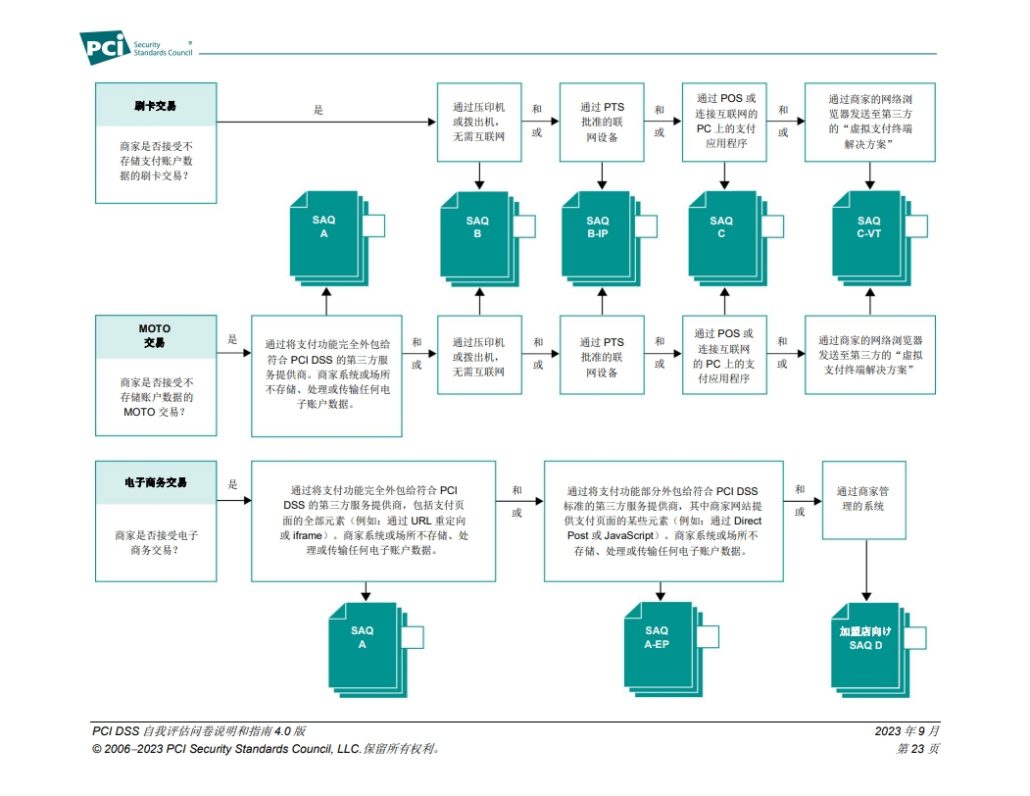
For e-commerce, these SAQ versions may apply:

  • Service Providers

SAQ D for Service Provider:

Applicable only to service providers, it includes the requirements from SAQ D for Merchants and adds criteria for documentation and customer policies, procedural reviews, configuration checks, alerts, penetration test records, and more, with a total of 259 questions.

  • Merchants

SAQ A:

For fully outsourced payment services (e.g., payment page using URL redirect or iFrame). SAQ A involves document checks, configuration checks, policy reviews, data retention and disposal, and external vulnerability scans. It’s the shortest SAQ version, with only 29 questions.

SAQ A-EP:

For merchants using an outsourced payment processor but managing their own payment page. SAQ A-EP covers SAQ A items and adds requirements for network management, host management, data security, vulnerability management, access control, and monitoring/testing, with significant additional requirements due to partial involvement in payment processing.

SAQ D for Merchant:

For merchants with an in-house payment system or those storing cardholder data electronically. SAQ D for Merchant has broader requirements than SAQ A-EP, covering all PCI DSS requirements for merchants.

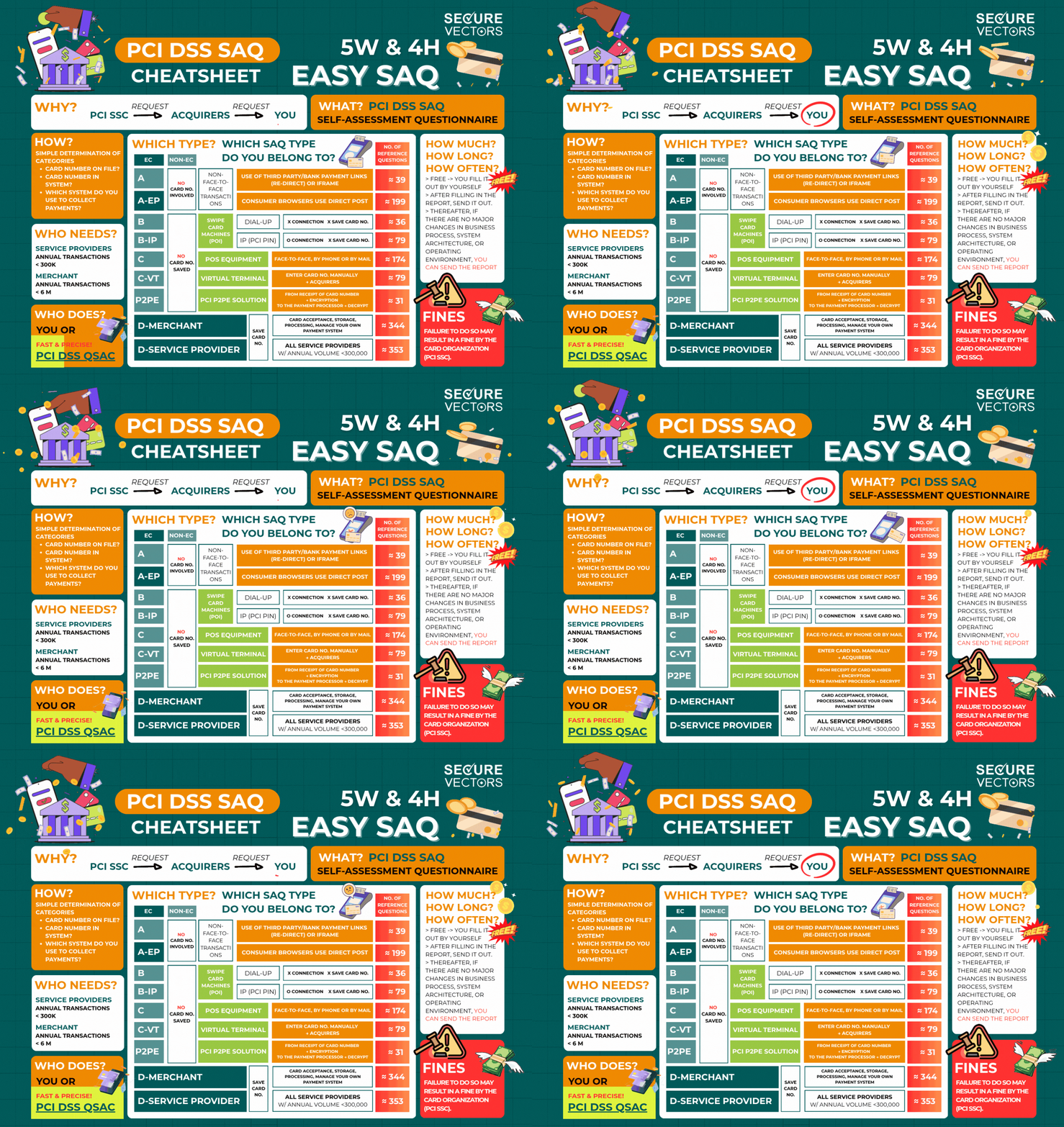
There are 10 different types of PCI DSS SAQs, each determined by the type of payment services you provide. The appropriate SAQ type is typically identified by your acquiring bank or with assistance from a Qualified Security Assessor (QSA), who can review your Cardholder Data Environment (CDE), cardholder data processes (such as card number handling), and data flow to accurately determine the applicable SAQ type. Alternatively, you can refer to the following PCI DSS SAQ type descriptions for a preliminary assessment. For your preliminary assessment, refer to PCI DSS SAQ types provided below.

If you need more information about SAQ types and achieve PCI DSS compliance effectively and accurately, the professional advice from QSA or QSAC is highly recommended. Their expertise can provide valuable insights tailored to your specific needs and ensure your compliance in the most effective manner possible.